Welcome to Ultimate TV.
How It Works
Get started in just 4 simple steps
Choose Your Plan
Discover a subscription plan tailored to your needs and budget.
Make Payment
Complete your payment securely using your preferred method.
Receive Login Details
Get your IPTV login credentials instantly via email or WhatsApp.
Start Watching
Sign in on your device and unlock unlimited entertainment anytime. ✨
Why Choosing Ultimate IPTV UK?
INSTANT AUTOMATED DELIVERY
Your login credentials and easy setup instructions are emailed to you within seconds of purchase. No waiting for manual WhatsApp replies. Start watching instantly.
BUILT-IN VPN & ANTI- BLOCK
Perfect for UK viewers. Bypass blocks. Enjoy smooth, private streaming without paying for a third-party VPN.
ZERO AUTO-BILLING
We never trap you in a contract. You are buying a prepaid pass. Pay only for the time you want your card will never be charged automatically next month.
Key Features
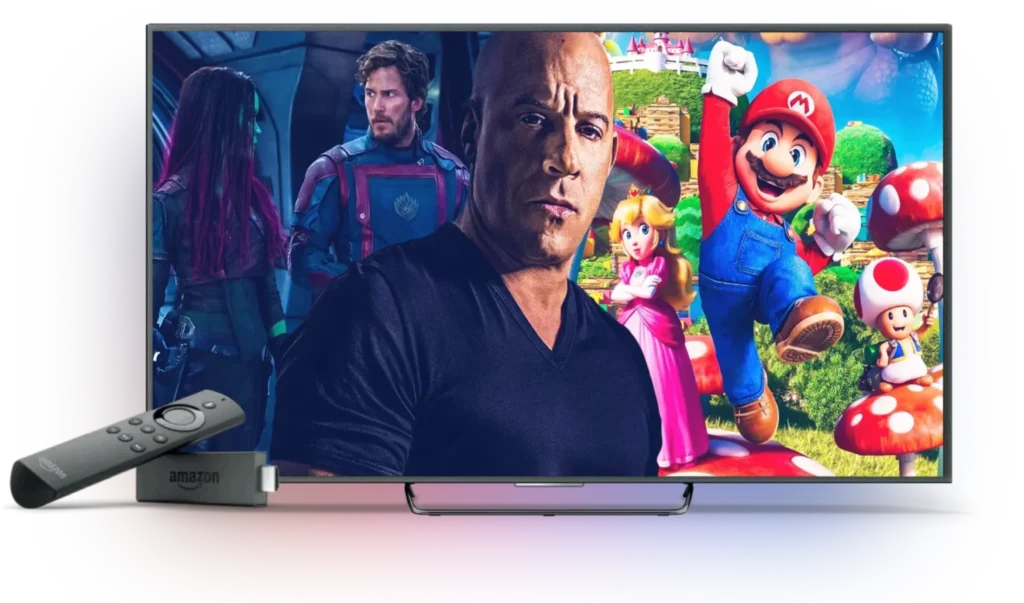
- Stream UK IPTV in FHD & HD
- No Buffering – Fast, Stable Streaming
- EPG & TV Guide Included
- UK/US/EU/Asia Channels – All in One
- 34,000+ Worldwide Channels
- 195K+ Movies & Series
- Watch All Football
- Weekly Updates: New Movies & Series!
- Request Channels & VOD Anytime!
- Watch All PPV Live Events
- Works on All Devices – Watch Anywhere!
- 4-Day Catch-Up – No Missed Shows!
- Different Interfaces Available To Suit Your Needs
- 24/7 Support – We’re Always Here for You!
20K+ CHANNELS & 195K+ VOD
A massive entertainment library. Get over 20,000+ live premium channels alongside 195,000+ frequently updated movies and TV series.
Support All Devices
Watch your favorite content on any device: Smart TVs, Firestick, MAG, smartphones, tablets, Android Boxes, computers, and Apple TV
FAST, RELIABLE SUPPORT
Our Sky Plug TV dedicated customer service is available 24 Hours A Day, 365 Days A Year
Choose Your Perfect Plan
Flexible pricing for every viewer — no hidden fees
Perfect to get started
£10
1 Month Plan
Starter Plan
- Reliable Live TV Streaming
- Smooth Everyday Viewing
- Full HD / 1080p Quality
- Stable & Buffer-Free Streaming
- 20,000+ Live Channels
- 150,000+ Movies & Series
- TV Guide (EPG) Included
- No Contracts or Hidden Fees
- Works On All Major Devices
- Instant Activation
- 24/7 Support
Best for regular viewers
£25
3 Month Plan
Standard Plan
- Reliable live TV streaming
- Smooth Everyday Viewing
- Full HD / 1080p Quality
- Stable & Buffer-Free Streaming
- 20,000+ Live Channels
- 150,000+ Movies & Series
- TV Guide (EPG) Included
- No Contracts or Hidden Fees
- Works On All Major Devices
- Instant Activation
- 24/7 Support
More value
£40
6 Month Plan
Premium Plan
- Reliable live TV streaming
- Smooth Everyday Viewing
- Full HD / 1080p Quality
- Stable & Buffer-Free Streaming
- 20,000+ Live Channels
- 150,000+ Movies & Series
- TV Guide (EPG) Included
- No Contracts or Hidden Fees
- Works On All Major Devices
- Instant Activation
- 24/7 Support
Most Popular
£70
12 Month Plan
Ultimate Plan
- Reliable live TV streaming
- Smooth Everyday Viewing
- Full HD / 1080p Quality
- Stable & Buffer-Free Streaming
- 20,000+ Live Channels
- 150,000+ Movies & Series
- TV Guide (EPG) Included
- No Contracts or Hidden Fees
- Works On All Major Devices
- Instant Activation
- 24/7 Support
Easy Setup Guides
Start streaming on your favorite device in just a few simple steps.
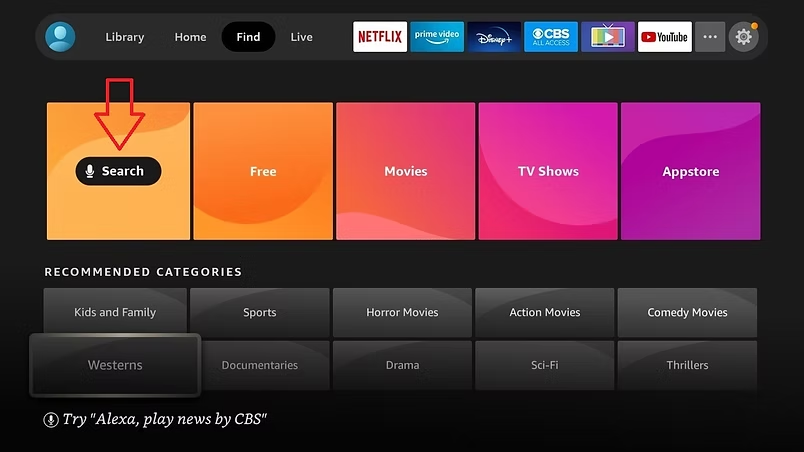
Firestick / FireTV Setup
Go to the Search function on your Firestick, open the Find tab, and type Downloader. Select the Downloader app — you’ll need this to sideload IPTV apps.
Choose Download to install the app. Once the download is complete, select Open, then click Allow when prompted to grant Downloader access to your media.
You’re now ready to choose an app.
Click here to view the available apps, then enter the blue link for your chosen app into the URL field within the Downloader app.
You can use any — or all — of our apps with the same test details or subscription login, at no extra extra charge.
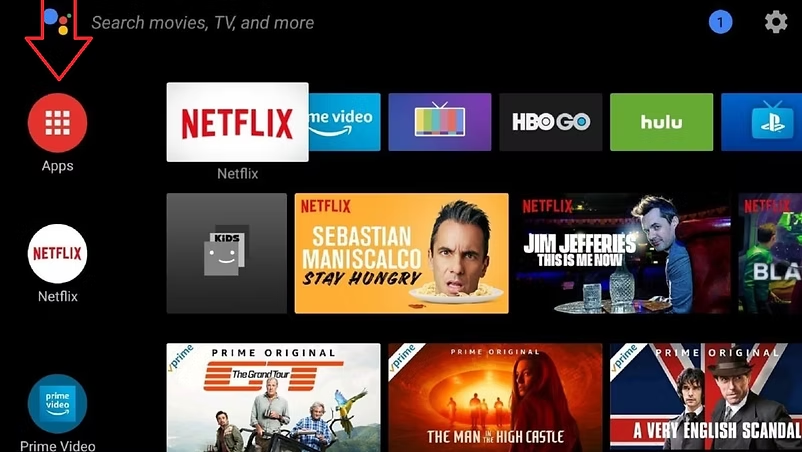
Android TV Setup
Click the Apps icon, then select Get more apps. In the search bar, type Downloader. This will locate the Downloader app, which you’ll need to sideload any IPTV app.
Select the Downloader app and click Install. The app will begin downloading. Once the installation is complete, select Open, then click Allow when prompted to grant Downloader access to your media.
Click here to view the available apps. Then enter the blue link for the app you want to download into the URL field within the Downloader app.
You can use any — or all — of our apps with the same test details or subscription login, at no extra charge.
Troubleshooting & Support
Quick solutions to common issues — get back to streaming instantly
If you experience buffering or lag while streaming, it’s usually related to your internet connection. Make sure you have a stable connection with at least 10 Mbps speed. Restarting your router and closing background apps can also help improve performance.
To run a speed test, open the Downloader app. In the URL field, type fast.com and press Go. This will display your speed test results and show the connection speed available on your Firestick.
If the issue continues, try switching to a different app or server, as this can often resolve the problem quickly.
If channels are not loading properly, try refreshing the app or restarting your device. Sometimes the issue is temporary and may resolve within a few minutes. You can also log out and log back in using your credentials to restore access.
If you’re unable to log in, double-check your username and password to ensure there are no typing errors or extra spaces. If the issue persists, please contact support for assistance with your account details.
If the app crashes or freezes, try clearing the app cache or updating it to the latest version. Restarting your device can also help fix temporary glitches. If the problem persists, reinstalling the app often resolves most issues.
How to Clear App Cache on Firestick 🔧
- From the Firestick home screen, go to Settings (gear icon).
- Select Applications.
- Click Manage Installed Applications.
- Choose the app you want to clear.
- Select Clear Cache.
This removes temporary files without deleting your login details or settings.
Tip:
- If the app is still having issues, you can also select Force Stop first, then Clear Cache, and reopen the app.
- Avoid Clear Data unless you’re okay with logging in again.
If you’re experiencing audio issues, first check your device volume and make sure it isn’t muted. You can also try switching audio tracks within the player settings.
Restarting the stream often restores sound if it stops unexpectedly.
If your subscription has expired, you may lose access to channels and content. To continue streaming, simply renew your plan.
If you’re unsure about your subscription status, contact support for confirmation and renewal options.
Terms & Conditions
By purchasing and using our IPTV services, you agree to comply with our terms and conditions. All subscriptions are intended for personal use only and must not be shared, resold, or misused in any way.
We strive to provide a stable, high-quality streaming experience. However, occasional interruptions or downtime may occur due to server maintenance or factors beyond our control. Continuous, uninterrupted service cannot be guaranteed at all times.
All payments are final and non-refundable once the service has been activated, unless otherwise stated. It is the customer’s responsibility to ensure their device and internet connection meet the minimum requirements for smooth streaming.
We reserve the right to update, modify, or discontinue any part of the service or these terms at any time without prior notice.
By continuing to use our service, you acknowledge and accept these terms.
Sky Plug
April 11, 2026
I have been using this service provider for the past last. The app by far has been the best one I have ever used. Everything is clear and easy to navigate. On occasion some streaming have gone down (for me 5/8 times in a year) but returned within minutes
Customer service is 💯 . Everytime I have sent a message with a minute have had a reply.
I have now purchased a second mobile subscription and just reviewed for another year

Moshan
Great service
April 10, 2026
Great service and value for what’s included.
The odd blip here there, which is to be expected but generally always on, easy to set up and easy to use.

Dave R
Great service
April 10, 2026
Brilliant service and back up from the admin if there is any issues
You definitely get mote than you pay for

Darren S
Quality
April 9, 2026
I’ve been with skyplug now for a few years now as are all my family and most of my friends the service is amazing I personally haven’t had one problem with the service pictures or anything and if you do have a question an easy text and it’s answered immediately can’t fault them at all totally recommend these chaps 5 ⭐️ for sure

Paul
Fast, Friendly, and Reliable — Customer Service Done Right
April 9, 2026
Absolutely brilliant if you get a problem contact them on WhatsApp and they sort any problems within minutes… I have been with them a few years.. and to me a good customer service is a must and they got that covered.. Nice one guys…

Neil

Quick Links
Join Our Newsletter
© 2026, Ultimate TV. All Rights Reserved.